
Hard Rock Bet sign up, step by step
Opening a Hard Rock Bet account takes a few minutes if you have your details ready. The flow runs on the operator's side; this guide never asks for your name, password or card.
- Open Hard Rock Bet from our buttonTap “Sign up in NJ / MI” on this page. It opens the operator's own sign-up flow; nothing is typed on this guide.
- Choose Sign upChoose to create a new account. One account covers the casino and the sportsbook, so there is nothing separate to create later.
- Enter your detailsUse your full name, date of birth, home address, email and a strong password. As is usual for US regulated casinos, you will typically be asked for the last digits of your SSN, and sometimes a photo of your ID.
- Confirm you are 21+Accept the terms and confirm your age. The online casino is for adults 21 and older only, in both New Jersey and Michigan.
- Allow location accessLet the app or browser check where you are. You must be physically inside New Jersey or Michigan to open casino games.
- Finish verificationOnce the identity check clears, the account is ready. Pick a welcome offer if you want one, then make your first deposit.
Your Unity by Hard Rock loyalty account is created automatically when you sign up, so there is no second registration. If you are weighing the welcome offers before your first deposit, the promo code page explains both options and why no code is needed.
Hard Rock Bet casino login (Hard Rock casino online login)
The Hard Rock Bet login is the same in the app and in a browser: the email you signed up with plus your password. One set of credentials opens both the casino and the sportsbook.
“Remember me” — only on your own device
The “Remember me” option saves you typing on a phone or laptop that only you use. Leave it unchecked on a shared family tablet, a work computer or anything public.
Forgot your password
Use the “Forgot password” link on the login screen. A reset link goes to the email on the account; follow it, set a new password, and log in again. If the email never arrives, check spam, then contact support through the Help Center, listed as available 24/7.
Why Hard Rock Bet login fails and how to fix it
Most failed logins are not about the password at all. They come from the location check or the identity check, which run separately from your credentials.
Location services off
The app needs your device location to confirm you are in New Jersey or Michigan. Turn location services on for the app in your phone settings and try again.
VPN switched on
Turn off your VPN before you play. It can make the check fail even when you really are in NJ or MI.
Outside NJ or MI
Casino games only open inside the two states. Where you physically are counts, not your home address.
Identity check pending
If your ID or SSN digits could not be matched, the account may be on hold until you upload documents. Look for a verification prompt in the account area.
Location rules
There is no workaround for geolocation, and this guide will not suggest one. The check is a condition of casino play in both states. If you are near a state line, move further inside the state and retry. The states page covers exactly where the casino and the sportsbook run.
Hard Rock Bet casino app for iPhone and Android
The Hard Rock Bet app is a single download for both the online casino and the sportsbook. The operator's casino page shows a 4.9 rating on iOS from about 100,000 ratings and 4.7 on Google Play. Those are store scores the operator displays, not our own test results.
Hard Rock Bet download: installing the app
- Open your storeOn an iPhone, open the App Store. On Android, open Google Play. The casino side of the app opens only in New Jersey and Michigan.
- Search Hard Rock BetType “Hard Rock Bet” and check the developer name and screenshots before you tap install, so you get the real casino and sportsbook app.
- Install the appDownload it like any other app. The same app holds the casino lobby and the sportsbook; you switch between them inside.
- Allow location servicesWhen the app asks, allow location access. Without it, the geolocation check fails and casino games stay locked.
- Log inSign in with the email and password you created, or tap “Sign up” if you are new.
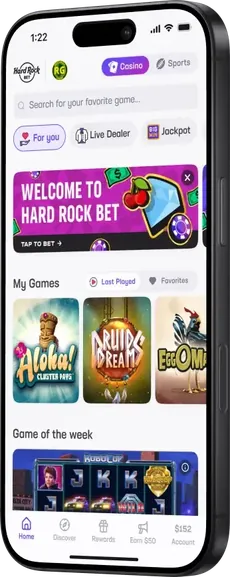
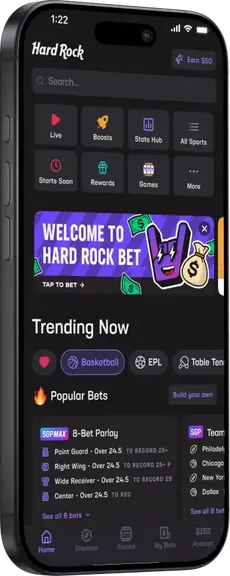
Playing Hard Rock Bet on desktop
You do not need the app to play. Hard Rock Bet also runs in a desktop browser, with the same account, balance and welcome offer.

Desktop has one extra step: a computer has no GPS, so the site may ask you to install a location plugin that confirms you are in New Jersey or Michigan. Allow it, keep it running while you play, and the check is usually quick after the first time.
Keeping your account secure
- Use a password you do not reuse on any other site, and change it if you ever suspect a leak.
- Never share your login, even with family. The account is tied to your identity and your payment methods.
- Log out on any device that is not yours, and skip “Remember me” there.
- Set deposit, wager and time limits in the account area before you need them. They are part of the same account.
Hard Rock Bet is run by Seminole Hard Rock Digital, LLC and is licensed by the New Jersey Division of Gaming Enforcement and the Michigan Gaming Control Board. Play is for adults 21+ only. If gambling stops being fun, call 1-800-GAMBLER in New Jersey or 1-800-270-7117 in Michigan.
Questions about Hard Rock Bet login and the app
Is it safe to tick Remember me on the Hard Rock Bet login screen?
Only on a phone or computer that nobody else uses. Remember me keeps you signed in, so anyone who picks up a shared device could open your account and cashier. On a family tablet or a work laptop, leave it unticked and log out when you finish.
Can I log in to Hard Rock Bet when I am out of state?
Casino games will not open until the geolocation check confirms you are physically in New Jersey or Michigan. Your home address does not matter here; your current location does. Turn location services on and retry once you are back inside the state.
Why does the app keep saying my location cannot be verified?
The usual causes are location services switched off for the app, a weak signal, or a VPN running in the background. Turn off the VPN, enable location access, and step away from a state border if you are close to one. On desktop, the site may ask you to install a location plugin; keep it running.
What do I need to verify my Hard Rock Bet account?
As is usual for US regulated casinos, expect to give your full name, date of birth, address and the last digits of your SSN. If the automatic check cannot confirm you, you may be asked to upload a photo ID. Verification has to be complete before your first withdrawal.
Is the Hard Rock Bet app free to download?
Yes, the app is a free download from the App Store and Google Play. The casino side opens only in New Jersey and Michigan. You only spend money when you choose to deposit. Real money play is limited to adults 21+ who pass the location check.
I forgot my password. How do I get back in?
Tap “Forgot password” on the login screen and enter the email tied to your account. Follow the reset link, set a new password you have not used elsewhere, then log in. If no email arrives after checking spam, reach the 24/7 support team through the Help Center in the app.
Bonus Spins or casino lossback — one welcome offer, NJ & MI
No promo code. 1x wagering on casino bonuses. Check the T&C for your state before you deposit. 21+, physically in New Jersey or Michigan.